Tricon Homes
- 4.6
- Rating
- 10.00K
- Installs
- Free
- Price

 Analysis by App-foxy
I found Tricon Homes most useful as a practical companion for residents who want to handle smart-home controls and housing-related tasks in one place. It is a free House & Home app from Tricon Residential, aimed at people living in Tricon properties rather than at anyone looking for a general-purpose home automation platform. That distinction matters: the app’s value comes from connecting everyday home management with the services offered through the residential community, not from replacing every smart-home tool on your phone.
After spending time with it, my impression is that this is a focused utility rather than an app you open for entertainment or broad home-improvement advice. The central idea is simple: use one mobile interface to interact with compatible smart-home devices and manage work orders. When those two needs overlap in daily life, the convenience is meaningful. When they do not, the app can feel more limited than a universal smart-home dashboard or a dedicated maintenance channel.
How Tricon Homes fits into daily home management
I like to begin this section by thinking about the app as a routine tool, not just something to reach for when a device misbehaves or a repair is needed. Its day-to-day usefulness depends on whether residents make it part of a simple habit: check the relevant controls, then keep housing tasks organized in the same place. The next section looks at where that combined approach earns its keep and where a different tool may serve you better.
You May Also Like

 Blood Strike: 2.5 Anniversary
Blood Strike’s Loadouts Turn Every Drop Into a Tactical Gamble
A close look at Blood Strike’s custom loadouts: how fast access to signature weapons reshapes its battle royale rhythm, rewards preparation, and narrows the gap between fights.

 Pandora - Music & Podcasts
Pandora’s Music Is Easy to Start, but Harder to Recover
Pandora’s strength is its low-effort path from a seed to a station. Its weak spot is how much confidence it asks you to place in connection, setup, and quiet recovery.

 8 Ball Pool
 Is Built on Rivalries, Rematches, and Routine
A close look at the rivalries, rematches, shared routines, and unanswered safety questions that turn a quick pool match into a persistent mobile community.

 Samsung Music
’s Quiet Strength Is Playing What You Already Own
Its reach comes less from spectacle than from dependable access to a personal library. That simplicity is both the app’s strongest retention engine and its ceiling.

 AccuWeather: Weather Radar
AccuWeather Review: A Quick, Clear Forecast for Everyday Decisions
For everyday plans, the best forecast is the one you can understand quickly. AccuWeather makes rain timing, radar, and local conditions easy to act on, with a few trade-offs.

 Hill Climb Racing
Why Hill Climb Racing Still Turns Crashes Into One More Run
A tiny car, a bumpy hill and one more upgrade: Hill Climb Racing keeps resurfacing because its simple chaos makes every near-miss feel personal.
More From Our News Desk
View All News


A free app with a specific residential purpose
The clearest point about cost is also the easiest to miss: Tricon Homes is free to download and use as an app. That makes trying it low-risk, especially for a resident who wants to see whether it simplifies routine tasks. The free access should not be confused with a promise that every home device, service, or housing-related charge is included at no cost. The app is a tool for managing the home relationship; it is not itself a statement that repairs, replacement items, or other residential services are free.
I appreciate that distinction because it keeps the value assessment realistic. You are not buying a premium software subscription, and there is no purchase decision inside this review to justify through advanced automation or a large library of extras. The question is whether the app saves enough time and reduces enough friction in your particular Tricon home to deserve a regular place on your phone.
Tricon Residential is the developer, which explains why the app feels tied to a specific living arrangement instead of being designed for every renter or homeowner. It is listed for Everyone, and the current release is version 2.3.15.1786053077. The app was released on October 13, 2022, and supports devices running Android 8.0 or later. Those details make it approachable for many Android users, although anyone with an older phone should check compatibility before relying on it for a move-in or maintenance task.
What the main functions mean in practice
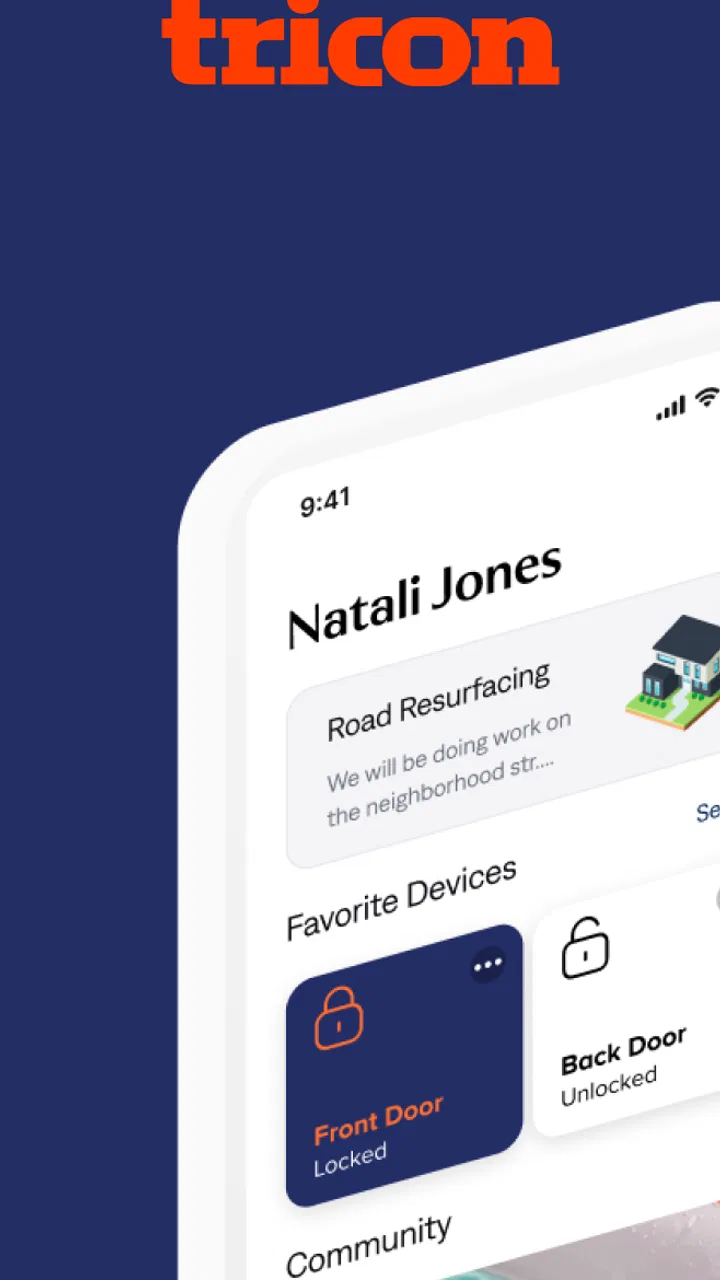
The two important jobs are smart-home control and work-order management. In practical terms, that means the app is intended to give residents a direct way to interact with supported connected devices while also providing a route for reporting or following up on property issues. I would think of it as a bridge between the physical home and the resident-service process.
The smart-home side is most valuable when a device is something you use repeatedly but do not want to manage through a separate, unrelated system. A resident might want to check the app before leaving, use it while arriving home, or reach for it when a device is not responding as expected. The benefit is not necessarily a long list of controls; it is having the relevant controls associated with the place where you live.
The work-order side addresses a different kind of inconvenience. Instead of treating a leaking fixture, faulty appliance, or other property issue as a loose conversation spread across messages and phone calls, a resident can use the app as the starting point for a service request. That creates a more organized workflow, particularly when the issue is easy to describe but difficult to remember later.
A realistic morning-to-evening scenario
Imagine returning home after work and noticing that a connected device is not behaving normally. You first use the smart-home controls to see whether the problem is a simple status or control issue. If the device still needs attention, you can shift from home control to the maintenance side and create a work order rather than searching for a separate contact method. Later, you have a single place to revisit the request instead of trying to reconstruct when you reported it.
That scenario shows the app’s strongest idea: the same residence can generate both technology tasks and maintenance tasks, and the app keeps them within one resident-focused experience. It does not eliminate the need for a technician or guarantee an instant resolution, but it can make the first step clearer. For someone who dislikes deciding whether a problem belongs in a smart-device app, a landlord portal, or a phone call, that consolidation is a genuine convenience.
Where the value is strongest, and where it falls short
For me, the strongest value comes from having a sensible first stop for both connected-home questions and property issues, especially when I want to keep a clear record without juggling channels. The trade-off is that a resident-focused app is not automatically the best choice for broader device control or every maintenance situation. Here I weigh those boundaries and explain when I would rely on another option instead.
Why combining devices and work orders can save time
The unusual value here is the connection between two workflows that are often separated. A generic smart-home app may be better at controlling a wide range of brands, while a typical property portal may be better centered on leases, payments, or resident notices. Tricon Homes brings device interaction and work-order handling together around the home itself. That focus can reduce app switching for residents whose property supports the relevant connected features.
One useful habit is to treat the app as the first diagnostic stop, not merely a button panel. When something feels wrong at home, check whether the issue is a controllable device problem or a physical maintenance problem. If the control responds, you may avoid submitting an unnecessary request. If it does not, recording the issue promptly through the work-order workflow can give you a cleaner timeline than waiting until the problem becomes urgent.
Another practical advantage is consistency. A work order created soon after noticing a problem is less likely to contain vague wording such as “this has been happening for a while.” I would use the app to write a short, specific description while the details are fresh, then keep the request available for later reference. This is a small workflow improvement, but it is the kind of benefit that matters more over several months than during a single test.
The trade-off against general smart-home platforms
If your priority is broad compatibility, advanced routines, or bringing devices from many manufacturers into one control system, a dedicated smart-home platform may be the better choice. Tricon Homes is not the obvious replacement for a universal ecosystem. Its advantage is residential context, not being the most expansive automation hub.
That trade-off is important for households with devices purchased independently of their Tricon home. You may still prefer a manufacturer’s app for detailed settings, firmware-related tasks, or controls that are not part of the resident experience. In that situation, Tricon Homes can remain useful for work orders while another app handles deeper device management. I would not uninstall a trusted device app simply because this one offers a more convenient home-focused entry point.
What can make the experience feel restrictive
The app’s narrow purpose is also its main limitation. Its usefulness depends heavily on your relationship with Tricon Residential and on the connected equipment available in your property. A person who is not a Tricon resident is unlikely to gain much from installing it, and a resident without supported smart-home devices may use only the work-order function.
That means the app can feel uneven from one household to another. One resident may open it frequently because both controls and maintenance are relevant. Another may install it only when something breaks. Neither experience necessarily reflects a problem with the software; it reflects how much of the intended service is present in that home.
I would also avoid assuming that putting a request into an app makes maintenance instantaneous. The app can organize the request, but the real outcome still depends on the property’s service process and the nature of the issue. For urgent hazards, I would use the appropriate direct emergency channel rather than relying on an ordinary digital work-order submission. The app is best viewed as a convenient management route, not as a replacement for judgment about urgency.
Small habits that improve the experience
There are several ways I would use Tricon Homes more effectively than simply opening it when a problem becomes frustrating. First, I would learn the smart-home controls before an emergency or late-night issue occurs. Knowing where the relevant device action lives can save time when you are already dealing with a malfunction.
Second, I would submit maintenance requests with observable details rather than conclusions. Describe what happens, when it happens, and whether the issue is constant or occasional. That gives the work order more practical value than a broad label. Third, I would revisit open requests instead of creating duplicates when an issue has not yet changed. Keeping one clear record is generally easier to follow than scattering the same problem across multiple submissions.
A fourth tip is to separate a device-control failure from a physical fault before reporting it. If a smart feature is unavailable but the underlying fixture still works, the request may need a different explanation than a complete loss of function. This distinction can help the resident service team understand what kind of attention is needed and can prevent the app from becoming a vague complaint box.
Who will get the most from it
I would recommend Tricon Homes most strongly to current Tricon residents who have connected home devices and want maintenance requests close at hand. It is also a sensible install for residents who prefer a digital record of housing issues instead of depending on memory, scattered messages, or a phone conversation that is difficult to revisit.
New residents may find it particularly useful during the settling-in period. The first days in a home often reveal small device questions and maintenance details that are easy to overlook. Having the app ready can make it simpler to distinguish something that needs a work order from something that only needs a control adjustment. I would install it early, explore the available areas when things are working normally, and keep expectations practical.
On the other hand, I would skip it if you are not connected to Tricon Residential, if you are seeking a general home-control app for independently purchased equipment, or if you want a full property-management platform with a wider set of resident services. A free download does not create value by itself. If the app has no relevant home relationship or no supported task for you, it is just another unused icon.
How the rating and adoption affect my confidence
The app holds a 4.6 average from around 2.7 thousand ratings, with roughly 264 written reviews and over 10 thousand installs. Those figures suggest that many users find the core experience worthwhile, while also reminding me that the audience is specialized rather than universal. A strong average is encouraging, but it cannot guarantee that every resident’s device setup or service workflow will feel identical.
I read that kind of reception as support for the app’s basic usefulness, not as proof that it replaces every alternative. The most relevant test is still personal: does it expose the controls your home uses, and does its work-order process fit the way you report problems? If both answers are yes, the positive reception makes the free trial feel reasonable. If only one answer is yes, the app may still earn its place, but for a narrower reason.
My buy-or-skip verdict
There is no purchase calculation here because Tricon Homes is free, and that gives it a straightforward value proposition for the intended resident. I would install it when I lived in a Tricon property, especially if smart-home controls and maintenance requests were both relevant. The combination is more useful than either function might appear in isolation because it connects daily device use with the practical reality of caring for the home.
My recommendation comes with a clear boundary: do not choose it as your main smart-home platform simply because it is free. Use a broader alternative when you need extensive device compatibility or advanced automation, and keep this app for the Tricon-specific tasks it handles best. That combination may be more effective than forcing one app to do everything.
Overall, I see Tricon Homes as a focused resident utility with a sensible purpose. Its best feature is not flashy technology; it is the reduction of friction between noticing something at home and taking the appropriate next step. If you are part of the intended Tricon community, the free access makes it worth trying. If you are outside that community or want a universal home-control system, I would skip it and choose a tool built for your actual situation.
FAQs for Tricon Homes
01What is Tricon Homes, and what can I use the app for?
Tricon Homes is designed for residents and customers of Tricon Residential communities to manage housing-related tasks from a mobile device. Depending on your property and account, you may be able to review community information, access important resident resources, submit or follow up on service requests, view messages, and manage parts of your rental experience without calling customer support for every question.
02Do I need to be a Tricon resident to use Tricon Homes?
Most of the app’s useful features are intended for people who rent or otherwise have an active relationship with a Tricon property. You will generally need valid account credentials or an invitation connected to your home. If you are only researching Tricon properties, the app may offer limited value, so prospective renters should confirm whether property searches and applications are supported in their region before downloading it.
03How do I sign in or create an account in Tricon Homes?
After installing Tricon Homes, you typically sign in using the email address associated with your Tricon account and the required password or verification method. New residents may receive registration instructions during the leasing process. If your email is not recognized, your invitation has expired, or you cannot reset your password, contact Tricon support or your property team rather than creating multiple accounts.
04Can I submit maintenance requests through Tricon Homes?
For eligible properties, Tricon Homes can make it easier to report maintenance issues from your phone. You may be able to describe the problem, provide access instructions, attach photographs, and check updates after submitting a request. Before reporting an emergency, review the app’s guidance and contact the appropriate emergency service or designated emergency maintenance number when immediate assistance is required.
05Is Tricon Homes free, and what permissions does it require?
The app is generally available to download without a separate purchase, although your lease, rent, utilities, or other property-related charges remain separate from the app itself. Tricon Homes may request permissions such as notifications, camera or photo access, and possibly location-related access for specific features. You can review and change permissions in your Android or iOS settings, but restricting them may limit certain functions.
Pros
- Simple way to browse available homes and property details.
- Useful for comparing listings in one place.
- Can help users discover homes matching their preferences.
- Convenient access to real estate information on mobile.
- Saves time compared with visiting multiple property websites.
Cons
- Listing availability may vary depending on your location.
- Some properties may have limited photos or incomplete details.
- Users may need to contact an agent for pricing or viewing information.
- The app’s usefulness depends on how frequently listings are updated.
- Not all homes or neighborhoods may be represented on the platform.

Tricon Homes
Gallery